Jul 29, 2011

Block Advertisements from Spotify

In case you wish to block advertisements from the famous free music service spotify, specially in case you wish to play music for parties or for some other purpose. This is just for you.


Blockify
Blockify lets you mute the advertisements and even better it can play alternate music from a music folder stored in you computer.It can also add customizable hotkeys to Spotify, so you can skip tracks, play, pause, shuffle, and change the volume with keyboard shortcuts.
Blockify simply rests in your system tray and mutes the advertisements as and when it detects one. In case you want to avoid the gap between the songs, you can fill that gap with songs of your choice.

Jul 28, 2011

Pirate Bay not woking! WTH

Seems that the the biggest and perhaps the most loved torrent website (the pirate bay) is down.
A large number of twitter users and few blogs are reporting that pirate bay is not working in their countries.
While initially I thought that the pirate bay would have been banned by the government, since some blogs have reported that companies such Reliance had been putting pressure on the government (this one here). However, currently this doesnt seem the case.
Seems that the people behind the pirate bay had some problems in their servers (some power problem out there) and according to torrent freaks this will be solved soon.
Update : The pirate bay is back, so early

This one's a good marketing Strategy for gmail from Google

Emailintervention.com, that's quite new strategy from Google to make its Gmail , even more popular among the masses. The website claiming that Gmail is much more better and superior to other forms of mail and hence should be the obvious choice of people and hence people help their friends switch to gmail by asking them to switch. Here's how
Staging an intervention is simple:
  1. Visit emailintervention.com
  2. Sign in and automatically identify who from your contacts has yet to make the switch, or just enter a friend’s email address manually
  3. Choose from one of three intervention message templates (“straightforward”, “concerned” or “ embarrassed”), and add your own intervention video if you’d like
  4. Send a customized email and follow up as needed

Once Again, What a strategy. But what is to be seen is whether people really join this?????
This post on Gmail Blog Save your friends from outdated email—help them switch to Gmail - Official Gmail Blog

How to get back old Facebook Chat back (Quick and easy)


With this method, you will be able to disable the newly introduced chat system and return to the old method within a few moments.
1) Simply click here
2) Install the Chrome Extension.
3) Whoa you are done. Press F5 or refresh your facebook page.

Incase it fails, close the chrome window and reopen it. If it fails still, go to extension manager and check whether the extension is correctly intalled and enabled.


You can toggle between old-style chat and new-style chat, using the Options menu in the buddy list.

To get videochat, just open a normal chat tab and then click the video icon in the title bar of the conversation.

Jul 24, 2011

How to get Free Web Hosting with Wordpress Installation

Generally there are a large number of web host available which provide free Web Hosting with ftp/ php - My Sql support. However, not many offer free (and easy) installation of scripts, except a few
Here are Some

  1. 000webhost.com : Positives

  • 1500 MB Disk Space
  • 100 GB Data Transfer
  • Unlimited Domains
  • No Ads or Banners
  • Your Own Ads Allowed
          Negatives
          Getting the account activated may take up time even in months. Rest all goes fine.
2.        Byethost.com
           Features
Account Specification File Management PHP
5500 MB disk space FTP account Zend encoder supported
200 GB monthly transfer Online file manager Ion Cube support
Free FTP software
Domains All file types allowed Statistics
50 addon domains
Disk space usage stats
50 parked domains Email Bandwidth usage stats
50 sub domains Custom MX records CPU time usage stats

MySQL query stats
MySQL
50 MySQL databases
Account Features
PhpMyAdmin Instant activation
Slow MySQL query stats Automatic Script Installation No forum posting required
Fantastico type installer VistaPanel Control Panel
Support Options Instant PHPbb forum Free setup
Free 24/7 support Instant SMF forum Password protected folders
Integrated support help desk Instant Media Wiki Account upgrades
Tutorials and help
Network tools
Downs
A large no. of times the script installer remains down


Temporarily disabledThe script installer is disabled pending further notice.Please use FTP to upload your scripts and manually install.If a script installer is required now, please consider upgrading to premium
3.   100Webspace.com
Provides Free Hosting for One Year with 100Mb Space, 3GB Bandwidth and Wordpress.


4. Freeweb7.com
          Features

7 GB disk space (store as many files as you need)
70 GB data transfer (all the bandwidth you would need)
FTP account (upload files via ftp or file manager)
7 MYSQL databases (use them wisely!)
PHP 5 (for those who need php to run scripts)
Easy to use advanced Control Panel and File Manager
Use our subdomain or your own domain name
No annoying popup ads or banners on your pages! 


5. Edublogs.org/
Edublogs lets you easily create & manage student & teacher blogs, quickly customize designs
and include videos, photos & podcasts - it's safe, easy and secure so try out an Edublog today!


6. Wordpress.com

How to Get a Free Top Level Domain name

Jul 21, 2011

List of Newest Proxy Servers (Many Wont have been Banned)


How to get a Spotify account anywhere in the world (without invite)

I was recently enthusiastic to join spotify. I had heard of this from a lot of places and was willing to try its interface. So I just Signed up.
Spotify requires you to b a U.K Resident (might have opened to some other countries) before you can sign up. However in case you use a UK proxy, spotify may never come to know about the whole process.
Step1: Getting the proxy thing
There are two ways. Use a website (for eg daveproxy.co.uk) Enter spotify.com their and click Go.

Or you can use FoxyProxy (a firefox extension and search from a list of UK proxies on the internet). Its easy.
For list of Free Updated Proxies, click here

Step 2: Sign up, fill up your information. Note : While signing up from a proxy, donot use your normal password. Use a crap one, thereafter you can sign in normally and change your password.

Spotify will ask you, your pin code. Use one from websites like this one and fill up. Or you can use wikipedia to search for some. Use these if you wish (London)
AL2 1AT  or   AL2 1AU

Tags : how to get a spotify account in india, china, outside Europe?  spotify invite code  spotify from anywhere  spotify without invite

Jul 17, 2011

Confusing Google Plus +

Finally Google plus has arrived with a privacy policy (oh no a circled policy) even more confusing than Facebook(or so it may seem)
Check out!!!111
source : nkjlive

How to recharge your mobile free India (All operator | No Hack)

The following Websites make it easy to recharge your mobile instantly giving some goodies (of same cost) in return. For example, if you recharge your phone with Rs 50, you can avail a coupon for Rs 50 at some store like Dominoes, mcdonalds. Valid for all operators such as Airtel, Vodafone, Idea, BSNL, Aircel, Tata Docomo, Videocon, MTS Virgin Telecom and others.

Free Recharge : This is a wonderful , tried and tested site that offers you a mobile recharge with an extra delivery charge of Rs 10/ recharge. Coupons available are of Dominoes, Mcdonalds, Pizzahut, Costa Coffee, Big Cinemas , Gini n Jony, croma, shoppers stop and many more.

Pay TM : Coupons offered are of naaptol, Seventymm.com, goibibo.com, fernsnpetals, kidloo and firstcry. Not a good variety of coupons.

Engineering360 : Here you get a free recharge by posting new (genuinely yours) articles on their website. A good idea, it seems.

Amulyam : All you have to do is to buy flight tickets, register on any websites, complete surveys..etc on the web, from their sponsor's websites and get free recharge instantly.

MTS Website : MTS provides some discounts on products such as cameras, LCDs, mobile phones and stuff if you recharge your MTS prepaid from their website.

Jul 6, 2011

A few ways to get your top level domain name free of cost

The other day, i had to purchase a domain name, but unfortunately due to no availability of a credit card, so i could not go ahead with it.
I checked out on a few sites which could help me out. Here were some schemes that were offering help.

1) Microsoft Office live small business : A few months back, i had clicked on an add, that wanted me to sign up Live mail and get a holiday package for a couple free. Looking at the profile of company like Microsoft, i did not sign up. A few days later, i got that advertisement back and thought i should sign up.
I got nothing as yet. Again there was this scheme from Microsoft. Sign up for this scheme, only if you are a resident of USA. Since Microsoft only gives freebies to US residents or use an US address.

Use IE to sign up and everything further
To transfer your domain from Microsoft  to some other company click here

2) Reliance Bigrock scheme : When I think of Reliance Anil Dhirubhai Ambani Group, i get some image of petty thiefs in my mind. They offer .in domains with some hosting facility on purchase of Reliance Data Cads. Since I already had one. I thought of applying for it. While purchasing the card, i wasn't informed of any such scheme. However soon they agreed and gave a link to enter my 10 digit number. Thereafter, iwas to receive a coupan on my email. But I got none.
Note : The scheme i now changed : They offer web.in subdomain.

3) Use some points service : A lot of websites (list given below) offer TLDs free of cos, if you particpate in their surveys. I did not give a try for them, since they appeared bogus to me. Do not use you main email id for them (create another and use that) and also use some new password to create an account (if you do).
 The list is :
Free Domain Site
Another Free Domain
FreePremiumDomains.com
cydots.com
getfreedomains.info


4) Keepindiaonline: They call it as an initiative to offer free .in domains to people of India. But they have some serious limitations. Firstly this is not an initiative, this is some private company, that offers you the cheap .in domain and they actually lock the domain. Further hosting would be done on their servers and there is no control panel. Its like initially you are sending the data to the company and they will place it for you. Later they will ask for money. Since i wanted the domain part only, i did not try this. Click here.

5) Get a domain with a hosting account : A large no. of hosting providers give domains free with hosting. However ensure that domain is registered in your name and you are free to transfer it. I am presently using ipage.com, they are quite reliable people Click here if you want one. (referal link)
Tip : While signing up (filling your details), click on the option to close the tab and they will ask whether you want to Leave the page or stay on it

Click Stay on Page
And on the next page. you may get some discounts. To use my referal Click here.


6)  Use a domain like co.cc, co.nr, .tk : Of these services, i think co.cc is the best service. They offer a full DNS service. Actually this i a subdomain, but looks like domain. They offer full DNS Control. Do not use tk and co.nr, they are bad for the SEO thing. 
If you know any other service like these, please post in the comment section.

Note : There are many schemes that might have and will come up like the one specified in (i), (ii), (iii) and (iv). Do not fall in such traps. Use (v), but not very often.

There is actually no service, giving domains for free. Do not waste your time in all these things. and even if such a scheme comes, do read its terms and conditions fully.

In case, you are in a situation like me, you are not having a credit card. there are companies that allow you to get a domain by depositing in their accounts directly (Ultimately i used this). For India, there is Bigrock, with such scheme. Check them out. Or use Paypal.

Tags : Free Domain name, top level domains for free.

Jun 29, 2011

Firefox no longer in Google Pack V3

Remember the old Google Pack, we used to download years ago, a collection of free popular softwares (according to Google's point of view), that came up with the single installation package.

Although the pack is no longer popular, with the users mostly choosing their own sets as per their own wish. However, Google yet delivered the version 3 of this pack today. While, till now google was involving all the best available softwares, today's version had a setback, with the biggies such as Mozilla Firefox, Microsoft's Skype, Real Player (Apple), Spyware Doctor (Oracle) and many more (all from Google's rivals) had been missing from the latest version.
Previous Version of Google Pack

The Present Version without the Rivals
This is I believe a shift from Google's so long Tagline : Don't be Evil

How to get Facebook friend’s mobile numbers

There is a new Chrome Extension that allows you to import all your Friends Phone onto your Gmail or a CSV File.

This extension allows you to get your friends information that they shared to you:
- Name
- Emails
- Phone numbers
- Screen names
- Websites
- Address
- Birthdays

Install this free open Source Extension (Facebook Friend Exporter) in your Google Chrome Browser.

Now login to your facebook.com account.

Go to your http://www.facebook.com/friends/edit/


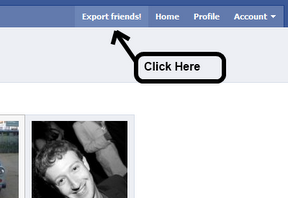
Now click on “Export Friends” (this option will come only if you installed Facebook Friend Exporter properly)


Continue as Directed.

Now, it will ask you to select any of the option (Gmail or CSV) to export the details of your friends profile. (ofcourse you can select both of the options)

Select the desired option and do as directed

InCase you selected GMail, sign in to your Gmail Account


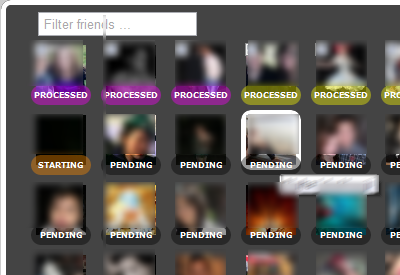
This will work only for 50 profiles at a time, since fb only allows 60 profile views per hour. It will stop after 60 views after which you can restart.

To know: How to export email addresses of all, click here

Note : In wake of fear from Google Plus, the extension might have been banned by Facebook

How to Export Email Addresses of All Facebook Friends.


Facebook doesn't allow people to export email address of its users in any way. However finally there is a way with your yahoo mail.
I recently had all my contacts deleted for not using Yahoo mail for long. So I tried this tool.

New! Import email addresses from your Facebook friends to Yahoo! Contacts. Get Started
    • Sign in to your Yahoo Account.
    • Click onto www.address.yahoo.com
    • Click on the Facebook icon
    • Now it will ask you to give Yahoo access to your Facebook account.
    • It will take some time and finally all your contacts from Facebook will be imported to your Yahoo Mail/ Account.
    • Success you are done


    Jun 25, 2011

    An open letter to Mark Zuckersberg


    Until last year, i did not know much about you, I knew of facebook being popular but never bothered  much to know about its backend. Last year when I first heard of an upcoming movie the social network, i simply thought of it as just another movie where people would be making love over some social network (probably facebook).
    Time passed and I got to know about it a bit looking the trailers and all and as i looked onto the movie, the movie became one of my most favorite and Mark you became a household brand probably. People were talking much more about you than any other hero of your category and even better, many wont talk of   Steve jobs, Bill gates or Larry Page (the google guy) as much as they talked of you. You know that, especially with Mr Obama invited you. You reached a peak at one point of time.
    But eventually the worse has happened over now, facebook perhaps has been unable to take over the celebrity status you all got. But that eventually is not entirely your mistake. Wikipedia suggests that your stake in the company is only at 24%, seems, most partners donot listen to you and are making money just by putting your name ahead. Off late,most of your so called facebook’s customers are unhappy and usually complaining about facebook’s privacy concerns.
    You have been rapidly changing your privacy policy which seems to be longer that the Constitution of the United States of America, WTH do you suppose that we will and read that the whole day long. A large number of scams of phishing attacks on fb users have been reported, you know that don’t you? Over the years facebook has been leaking information about its users to third party companies, changing its recommended  settings to worse and worst. And unlike twitter you don’t bother to inform your customers, which even makes that worse.
    To be honest, most people (including me no longer find facebook intresting, the way it used to appeal to me is no more Seems some day I along with many others will discontinue (or deactivate) my facebook account on the lines of millions of others who have already done so. You are lucky that till no other site has started doing to you what you did to orkut. But it wont take much time for all those guys (yeah not girls) sitting in Harvard or Standford or aka NSIT or the less famous IITs (oops) to replace your so popular site.
    On an ending note I sincerely hope you will try and understand and also think of better method to overcome the problems faced by your users and at the same time, think of better methods to safeguard the customer privacy and ensure that you keep earning and remain a household brand i talked about.
    Yours sincerely
    Facebook User

    Jun 23, 2011

    Politicos


    Having written quite a few blog posts on Tech things, i thought to shift a bit. I plan to write on one of my favorite topics of pastime Politics, especially considering the kind of  corruption prevailing in the society near me. With the Indian Government being accused of newer and even worse scams every other day, with the return of dictatorship type democracy in the country. Surely these are tough times and I wish to write my mind here on WP.
    But before someone plans to read me, i wish to clear myself, my stand on the politics and my opinion about the nation and its leaders.
    I am a hindu, but that does not mean I subscribe to the core Hinduwadi ideology and that does not also mean that the government can stop from speaking against corrupton.
    I dislike Ramdev but would support him when he raises his voice against the government, i have fully understood and  support each and every of his demand.
    I dislike BJP to an extent, but i like Atal Bihari Vajpayee and Narendra Modi.
    I dislike Congress but i like ummm…..??
    Like most Indians I believe Digvijay Singh is the biggest and most useless sycophant the Government would have ever seen.
    I believe Rahul Gandhi is not ideal for the future post of dictator in India (if it ever be). He simply makes a lot of bogus statements, but simply fails to take actions at large.
    I believe LK Advani has never been and would never be able to become the PM. He simply doesn’t fit for this post.
    Given the fact that the top most officials of Government have been caught red handed in so many scams, it should resign and let people decide the future of this country.
    I accept the fact that Ramdev might have earned a lot of money through whatever methods, but that does not mean he simply cant raise his voice against the Government.
    I fully understand what Lokpal (if implemented correctly) would mean to the people and government of India and the Indian Government being afraid to pass that is simply due to the fear that it may make matters  worse for the Governments like the current.


    Jun 22, 2011

    Notepad plus plus (+1)

    Recently I moved onto Notepad++, an open source application that is a bit turned towards programmer's use. I had downloaded this application earlier too but for some reasons, was unable to use this software.
    The application seems to be simple and fast.
    I had been for long saving my text data on .txt format, that helped me save a lot of space and therefore any replacement for this was like unacceptable to me. However turning onto Notepad ++ was easy and favorable due to a variety of reasons.

    1) Free of Cost : The fact that notepad++ being built by an Open Source Community, which makes it available free of cost was probably the best reason that I tried onto it and replaced notepad.There are several other text editors available (& probably many are free) And its not that I have not been using paid softwares (the ugly windows for example, i had been using until now), but obviously this fact counts. Hope you get the point.

    2)Line No's : Having installed the software, the first thing my eyes went on was the numbering of lines. This provides a lot of ease. For example, I had recently compiled a JAVA program which had some errors in the 40 something line. Imagine an even bigger program and you are made to count the lines every time you use notepad.

    3) Multiple Language Support: Supports C | C++ | JAVA | Matlab | php | Python | Pascal | CSS | JavaScript and much more

    4) Low Resource Consumption : The Best thing, uses very less amount of resources. This when coupled with a large variety of settings makes it simply the best.
    To visit website : Click here

    Jun 21, 2011

    Wikipreview

    While most of us are articles (yeah sometimes we have to) on the Wikipedia, we generally find words, that seem to be unknown and we end reading about them in a new tab.
    I supposed this happened only with  me, but this seems to be a universal phenomenon, we open up an article and end up following a trail a links just to know about the first article.
    Now there seems to be a solution at least for the Google chrome users. Google Chrome now has a new extension called Wiki Preview.
    Th extension is as expected free of cost and is available on the chrome store.

    One can check it out here

    Jun 20, 2011

    javac is not recognised as an internal or external command ??

    Recently I started with JAVA SDK. Not so long ago, i thought  I would be moving on to java but was unable to compile it on PC for days. Part of it was due to some kind of lazyness and my be overconfidence. I dont what but as I began writing the first simple program into the worlds best text editor Notepad (or so it may not seem, no not Notepad ++) , seemed there was a problem.
    I went on commmand prompt in and wrote what you would expect me to

    C:>javac Program.java

    And there was an error....Oops

    javac i not recognised as an internal or external command and i was like WTF?
    Checked on the installation....yeah i had installed the correct version on the correct machine and correctly....yeah.
    Googled that for long, google seems to be frustrating these days....especially when these SEO people have come up. Reading on to the forums I had troubled myself long but i had to find the solution.. took a long time but there was a solution....yup

    I would keep it straight wont trouble you with all those damn things that these forum people say.

    First step is to check whether you have successfully the java thing or not. Open Command Prompt
    Write
    C\>java -version
    It will show you the version of Java you need.
    Then in the C drive (back to windows), go to Program files and thereafter the java folder.
    Search out for javac.exe file. It will Probably be there inside the bin folder.  Note Down its address.
    In my case it was
    C:\Program Files\Java\jdk1.6.0_25\bin  Copy the one in your system.

    Here you go,
    Go to Control Panel. Check out System. Then to Environment variables, therein you will find system variables and there is Path. Click on Path and create Edit beneath. (In case there is no Path variable, click New)

    A new dialog box will appear. Therein the variable value, (caution: it may cause problem for other programs) do not delete anything. Just Add the address (you copied above) to the the list and finally in my case for example will appear like this


    C:\Program Files\Java\jdk1.6.0_25\bin; C:\xyz................


    Click OK to exit the Dialog Boxes and you are done. finally

    Go back to command Prompt and you are ready it seems.

    Tags problems with javac .exe; unable to compile java; where to compile

    May 7, 2011

    Get Paid to promote


    BRIEF OVERVIEW

    Paid-To-Promote was launched in 2005. Ever since then, it has been paying its members promptly. The key benefits of this CPM advertising platform is that you are able to promote it on any websites, even if you don't own that website, only websites with illegal contents are not allowed. This gives you the flexibility to promote it really anywhere and everywhere. However, it is using iframe and may contains redirections so it may not be suitable for use in conjunction with some other programs.

    EARNINGS

    You would earn $1 to $8 for every 1000 views delivered for traffic from United States, Canada, Australia, United Kingdom, Austria, Belgium, Denmark, Finland, France, Germany, Iceland, Italy, Netherlands, New Zealand and Spain. However, visitors using proxies or without javascript enabled browsers or stay less than 10 seconds will not be accepted as a valid view.
    You would also earn 10% of your direct referral earnings and 5% of your level 2 referral earnings.

    INSTRUCTIONS FOR EARNINGS

    1. After you have signed up and logged into your account, you can obtain the code for publishing in websites in the first box. The code in the second box is your referral banner and links.

    To Join Click here
    TAGS : Paid to promote   |     Earn money         |        Earn Money online        |      Paid to promote review
                                                         Purchase Structured Settlements  Secured Loan Calculator  data recovery service

    Free file sharing That pays to you - Ziddu


    Ziddu will pay you for uploading and sharing your image, audio, video and document files online. There’s no limit on how many files you want to upload and share and most of all it’s FREE of charge!
    Some people use Ziddu as their online file repository or storage space. For some bloggers, they use Ziddu as the target source for their image, audio or video links (instead of linking to photobucket, youtube, etc.).
    For each file you upload to Ziddu, you will be provided with a download link to it. This download link you can share to your family and friends. You can also use the download link to your webpage or blog. Uploaded files not accessed more than 90 days shall be automatically deleted or you can manually delete them at your option. The maximum file size that you can upload is 200 MB. Bigger than 200MB, you have to split the file using a file-splitting program
    Earnings:
    You will get $0.001 for each Unique download. Redeemed cash will be transferred via PayPal or Moneybookers once it reaches $10.
    10000 Unique Downloads: $10 
    50000 Unique Downloads: $50 
    100000 Unique Downloads: $100   
    500000 Unique Downloads: $500   
    1000000 Unique Downloads: $1000   
    You will also get a $0.10 Referral Bonus when someone joins with Ziddu through your referral link and uploads his/her first file!
    According to its Terms and Conditions, uploaded files shall not: 
    1. Spread messages of terror or depicts torture or death
    2. Harm minors in anyway, this includes child pornography
    3. Infringe any patent, trademark, trade secret, copyright or other proprietary rights of any party
    4. Promote illegal or adult content
     Click HERE to join Ziddu.

    Apr 23, 2011

    Hide or Password-Protect Files and Folders with Free Utilities


    Hide or Password-Protect Files and Folders with Free Utilities available!


    • TrueCrypt : The strongest and most bulletproof consumer encryption tool out there is the free, cross-platform, open source TrueCrypt .The ultimate freeware encryption program, TrueCrypt is loaded with powerful features that users concerned with protecting data from prying eyes will find robust and comprehensive.
    • 7-Zip: Primarily an archiving, zip utility, the free 7-Zip offers a handy feature for the privacy-minded: the ability to password an archive you create with it. Keep in mind that others can browse file and folder name listings in passworded archives, but the password is required to extract them.
    • KeePass: To secure a list of passwords or software serial numbers, look no further than KeePass Password Safe, an encrypted database that will lock up your sensitive logins tight as a drum. A lesser-known KeePass feature lets you attach files to database entries, which means you can also use it to lock up data as well (though this works best for files associated with various KeePass entries).
    • My LockBox : It won't stop someone from finding your files by booting up a Linux live CD, for example, but for a simple way to assign a password to a folder, My LockBox gets the job done.
    • Free Hide Folder 2.0 : Similar to My Lockbox in that it's low-level protection, Free Hide Folder does a bit more than just checking off the "Hidden" box in Windows' file Properties dialog.
    • fSekrit : Turn your secret plain text file into a password-protected .exe file with fSekrit, which is small enough to fit snugly on your USB thumb drive.
    • Folder Lock (look on CNET) : Snoopers can't find or access the files you hide using Folder Lock, even in DOS or under other operating systems. This application provides two levels of protection: you can merely lock files and folders, or you can encrypt them using the 256-bit Blowfish algorithm. When you boot up the program, it'll ask you for a master password. Hitting the Browse link locates and lock folders anywhere on your computer, or you can simply secure them via the context menu. Encryption is limited in the free version to 25 MB.
    • Many more, such as Lock and Hide Folder often come with a high price or their trial versions have serious limitations.

    Has Someone unfriend you on Facebook. Check Out.

    Continuously grooming your list of people who've wronged you requires a lot of upkeep and thought. Let Unfriend Finder help you out by keeping track of the people who ditch you as a friend on Facebook.
    There's nothing terribly surprising or complicated about installing and using Unfriend Finder (What a name! eh). You just download it, install it in your web browser of choice (assuming your choice is either Chrome, Firefox, Opera, or Safari), log into Facebook, and let Unfriend Finder do its job. It's important to note it's not retroactive, so you're not going to find a bunch of lost friends just by installing it. Instead, install it now, be patient, and wait for certain "friends" to drop you thinking you won't notice. You will, and you'll be able to some day remind them of their indiscretion.

    Mar 30, 2011

    Why I’ve Switched From Chrome to Firefox 4


    Why I've Switched From Chrome to Firefox 4You've probably heard a lot about Firefox 4's new interface, speed, and feature improvements, but many of you have already left it for Chrome. Here's why Firefox's newest version is worth another look, even if you're a diehard Chrome user.

    I've never been much of a Firefox user myself. I switched between browsers a lot until Chrome came out, after which I used it almost exclusively. It was fast, extensible, available on all platforms, and the more it gained in popularity, the better it became. Sure, it had its quirks, but it was the best I could get at the time. Firefox's slowness really turned me off, so I never really gave it a chance.
    With everyone talking about how great Firefox 4 is, though, I decided to try it out.While Most of us have switched to Chrome for their main browsing needs, but Chrome was starting to irk me in small ways and if Firefox could hold up on its promise of higher speed, it could actually sway me away from Chrome. A few days after switching, I fell in love and haven't looked back. If you haven't looked at Firefox in awhile (or never really used it in the past), here's why you might want to give it another shot.

    It's Pretty Darn Fast

    This was the big one. Firefox's sluggishness was the main thing keeping me away before, but now that Firefox has added some serious speed increases to its browser, it's not nearly as painful as it used to be. In fact, it's not painful at all. It might not be quite as fast as Chrome sometimes, but it's pretty comparable, putting the two on a more level playing field and making Firefox's other advantages much more worth switching for.

    A Minimal, Fully Customizable Interface

    Firefox 4's new interface adds some nice improvements, like tabs on top, the Firefox menu, and the removal of the status bar. They've also gotten rid of or moved some of the more clutter-inducing navigation buttons, like the reload button, which is a welcome change.
    The changes weren't perfectly executed, of course—the Firefox menu isn't in a great spot, and tabs on top doesn't actually save you any vertical pixels. However, Firefox's UI is so customizable that it doesn't really matter. We've already shown you how to move the Firefox menu to a more appropriate location, and use the extra space more efficiently for a Chrome-like tabs-on-top setup.
    Why I've Switched From Chrome to Firefox 4 But then I can already hear you Chrome fans saying, "how does making Firefox look like Chrome make it better than Chrome? Isn't it better to not have to do that work?" While Firefox's UI isn't as great as Chrome's out of the box, what makes Firefox decidedly better is that you can customize it to an insane extent. Once you've gotten rid of the things you don't like, you can add the things you do like. Chrome lets you make one change to the navigation bar: you can add a home button. Beyond that, you're on your own. Firefox lets you add a full screen button, zoom controls, an RSS button, a bookmarks menu, and a ton more out of the box, and even tell it whether to use small or large icons. Sure, you can do a lot of this in Chrome with extra extensions, but Firefox already has it all there.
    Furthermore, Firefox has that handy userChrome.css file that lets you really dig down and tweak every pixel of the interface—literally. We feature tweaks for the userChrome file all the timer—like this recent URL preview hack, as well as a trick to make the Firefox button a little less annoyingly neon. And, with all the Firefox users out there, you can pretty much Google anything you want to change about Firefox's interface and find a CSS tweak. Don't forget about the Stylish add-on, either, which lets you tweak not just Firefox's interface, but the interface of nearly any web site you want, which can be extremely handy.

    About:Config

    It certainly isn't new to Firefox 4, but the about:config page is still one of the best features Firefox has to offer. Just like the userChrome.css file, it lets you tweak a ton of different preferences that aren't available in the normal preferences menu. Want to preview open tabs when you cycle through them using Ctrl+Tab? There's an about:config tweak for that. Annoyed that Firefox automatically enters "Work Offline" mode when you disconnect? There's a tweak for that too. There are also tweaks for making spellcheck stand out more, making it ask to save your tabs when you quit, and save memory by waiting to load tabs until you click on them. Sure, Chrome has that neat about:flags page, and it is a bit easier to use—but it doesn't give you anywhere near the power Firefox's about:config page does. In the end, both userChrome.css and about:config are all about customization. Firefox gives you a level of customization that is just unparalleled in other browsers.

    You Can Actually Sync Custom Search Engines

    This seems like a small thing, but is actually a huge deal to anyone that uses custom search engines. I use them for every search engine I frequent, whether it's searching for videos on YouTube, or for guitar tabs on Ultimate-Guitar.com. Not only that, but you can use them to perform nearly any task right from your browser's address bar, like add an event to your calendar, a task to your to-do list, find directions with Google Maps, and a ton more. They've become such an integral part of my browsing that it's infuriating that I can't sync them between Chrome installations—as soon as I pick up one of my other computers or boot into one of my other partitions, I have to create them all over again. Since Firefox actually integrates these into your bookmarks, they sync right along with your bookmarks, whether you're using Firefox Sync or something like Xmarks. It's a feature that Chrome is severely lacking, and that Firefox has had all along.

    Mobile Sync

    Why I've Switched From Chrome to Firefox 4Very strangely, Android users can sync better with Firefox than they can with Chrome—they just need Firefox Mobile. Firefox Mobile syncs with Firefox on your desktop better than Android's browser ever synced with Chrome. You can sync your bookmarks, history, passwords, form data, and open tabs between the two, so when it's time to leave your computer and browse on your phone, you can start your session right back up. Chrome only has one-way link sharing with Chrome to Phone, after which you'd need to seek out a bunch of other add-ons to even come close to the same syncability. If you browse on your phone, Firefox makes it easier than ever.

    Security Certificates

    Why I've Switched From Chrome to Firefox 4This is something you may not run into often, but it was one of the first things that made me want to leave Chrome. Chrome doesn't seem to handle SSL certificates in nearly the polished way Firefox does. If you visit a secure page that isn't trusted, Firefox will let you add an exception with the click of a button. Chrome is much more hard-headed about this, which is annoying when you know the page is trustworthy. In fact, sometimes Chrome won't even give you the option of going through to the page—it'll just throw you an error. A browser isn't very useful when it doesn't let you access sites you need regularly.

    None of this is to say that Firefox is perfect, of course. It doesn't have quite the "smoothness" that Chrome does, and if you leave it open for more than a day, it'll steal more of your memory than a bottle of José Cuervo, but overall Firefox's stability and customizability have won me over. If you've given Firefox 4 a try and have any thoughts on the matter—whether you agree or disagree—be sure to share them in the comments below.

    By